Building Your Digital Twin: A Step-by-Step Guide to Modern Warehouse Visualisation

Updated: Feb 4

For decades, warehouse management systems have relied on abstract location codes and cryptic bin numbers. Workers memorise layouts, new hires spend weeks learning the floor, and managers struggle to optimise space without seeing the full picture.
The digital twin changes everything.
A digital twin is an exact virtual replica of your physical warehouse, complete with racks, aisles, zones, and inventory locations. But unlike traditional warehouse management systems that treat locations as simple text fields, a digital twin knows the actual dimensions, coordinates, and spatial relationships of every bin in your facility.
In this guide, we'll show you how modern warehouse intelligence platforms like 3DLogistiX are making digital twins accessible to small and medium-sized businesses. No engineering degree or CAD software required.
Why Your Warehouse Needs a Digital Twin
Before we dive into the "how", let's look at "why".
Traditional warehouse management systems store location data as text strings. Location "A-12-3" means aisle A, rack 12, level 3. But the system doesn't actually know:
How big is that bin is
What fits inside it
Where it sits in physical space
How to get there efficiently
A digital twin captures all of this information. Here's what becomes possible:
AI-Powered Put-Away Recommendations
When receiving stock, the system can suggest the optimal bin based on item dimensions matching bin capacity, weight limits of shelving, proximity to packing stations, and available space consolidation.
Instead of guessing or using outdated slotting strategies, your team gets intelligent recommendations for every put-away.
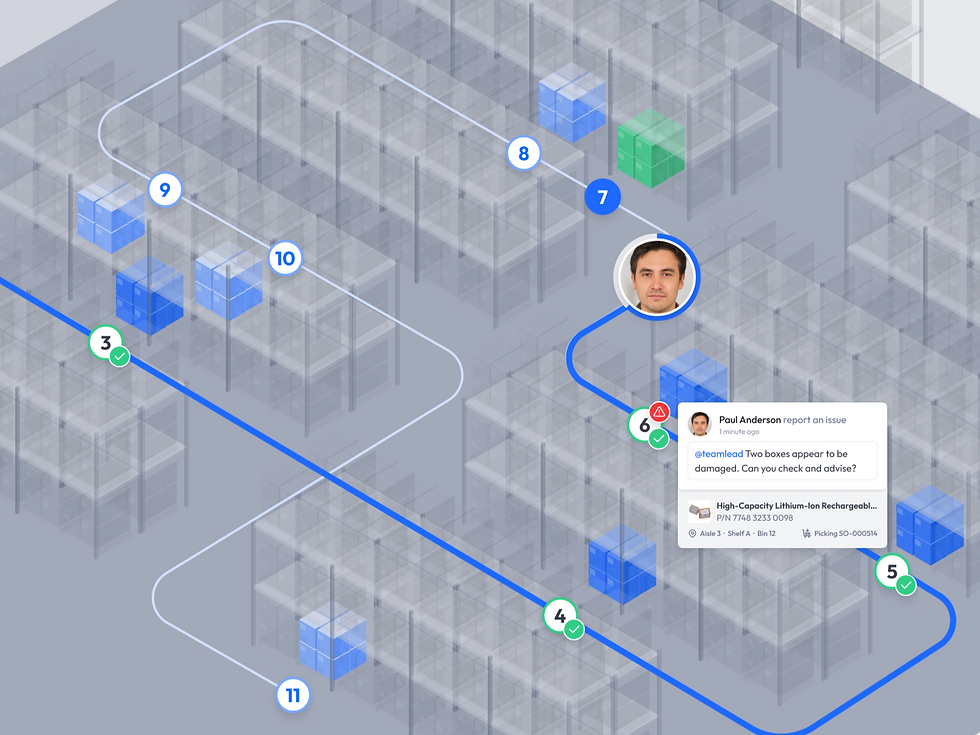
Indoor Navigation
Remember the first time you used Google Maps and never got lost again? That's what indoor navigation does for your warehouse.
Workers see a visual path on their smartphone showing exactly where to walk, which aisle to turn down, and which shelf to approach. No more wandering. No more asking the old hands, "Where's location B-23-4?"
New employees become productive in days, not weeks.
Space Optimisation
With complete dimensional data, AI can identify underutilised vertical space, bins that could be consolidated, fast-moving items stored too far from packing and slow-moving items taking up prime real estate.
The system can suggest relocating stock to minimise picker travel time and maximise space efficiency.
Visual Inventory Management
Click on any item to instantly see where it is located in the warehouse, displayed on a 3D map. Click on any location and see what's stored there. No more digging through spreadsheets or running reports.
Building Your Digital Twin: The Simple Way
Here's the reality that surprises most Aussie warehouse operators: you don't need expensive consultants, CAD software, or engineering expertise to build a digital twin.
If you can use a tape measure, you can do this.
Modern platforms have made the process surprisingly straightforward. Here's how it works:
Step 1: Map Your Warehouse Footprint
Start with the basics, the four walls of your warehouse.
You'll need the total length and width of your facility, the location of any permanent obstacles (compressor rooms, offices, columns), and emergency exit zones that must remain clear.
Enter these dimensions into the warehouse builder interface. Most systems let you drag and drop zones onto a grid, then specify dimensions.
Step 2: Define Your Zones
Zones help you organise the warehouse visually and logically. Common zone types include receiving area, quality assurance, packing stations, different customer inventories (if you're a 3PL) and product categories (DG/hazmat, refrigerated, high value).
Simply draw rectangles on your floor plan and name them. The system colour-codes each zone for easy visual identification.
Step 3: Add Your Racking
This is where the magic happens, but it's still remarkably simple.
For each row of racking, you'll specify starting position (X and Y coordinates), aisle width, number of bays in the row, levels per bay (height configuration), bin dimensions at each level and maximum weight capacity (optional but recommended).
Here's what makes it easy: once you configure one bay, you can duplicate it. Building an entire row becomes a matter of clicking "extend" until you've filled the aisle.
Different rows with different configurations? No worries. Just create a new bay template and repeat.
Step 4: Configure Bin Details
Each bin location can be customised with height, width, depth dimensions, weight capacity, barcode/location label (auto-generated or custom), and special attributes (refrigerated, DG-approved, etc.).
The system can autogenerate barcodes based on your naming convention. Print these labels and stick them on your physical racks. Now your digital and physical warehouses are perfectly synced.
Step 5: Map Operational Locations
Beyond storage racks, you'll want to map receiving doors and staging areas, packing stations, shipping docks, quality control areas, and equipment storage.
These become waypoints in your navigation system and help the AI understand your complete workflow.
What Your Digital Twin Enables
Once your digital twin is complete, you unlock powerful capabilities that transform daily operations.
Smart Receiving and Put-Away
When a purchase order arrives, workers scan items with their smartphones (no expensive scanners required). The system instantly recommends the optimal bin location based on available space, proximity to related products, weight distribution, and historical picking frequency.
Workers see the recommended location on screen and can navigate straight there using indoor mapping.
Guided Picking with Optimal Routes
When a sales order comes in, the system calculates the most efficient picking path. The AI factors in distance, aisle congestion, item weight, and multi-order tote building. Workers follow turn-by-turn directions on their phone, just like Google Maps, complete with a visual of exactly which shelf and level to pick from.
Training time for new starters drops dramatically. Pick accuracy improves. Walking time decreases.
Real-Time Inventory Visibility
Managers can click an item to see everywhere it's stored (visual 3D map) or click a bin to see everything stored there.
Need to cycle-count a zone? Select it on the map and generate the list. Want to move slow-movers? See them highlighted and plan the shift.
Continuous Optimisation
The digital twin isn't static. It learns. AI flags things like "Item X237 is picked 50 times a day but stored 60 metres from packing" or "Bin B-12-4 is at 40% capacity while B-12-5 is overflowing".
You get clear recommendations for slotting changes and consolidation.
Implementation: What to Expect
Hardware Requirements
Nothing fancy: any iOS or Android smartphone, standard web browser for the management interface, optional cheap Bluetooth barcode scanners ($50 to $80) and optional standard office label printer.
No pricey Zebra scanners. No proprietary hardware. No lock-in.
Integration
Seamless two-way sync with NetSuite and other popular ERPs. Stock levels, POs, and sales orders flow automatically.
Beyond the Basics: Advanced Applications
Slotting analysis (AI moves fast-movers closer to packing, slow-movers deeper), capacity planning (model "what-if" scenarios for new customers or extra SKUs), heat mapping (see where the bottlenecks are and fix layouts) and multi-site operations (run all your warehouses from one dashboard).
Getting Started
The barrier to warehouse digital twins has collapsed. What used to cost six figures and months of consulting now takes a couple of days and a fraction of the price. Australian SMBs can now also have the same spatial intelligence that the big players use, without the big-player price tag or complexity.
The question isn't whether your warehouse needs a digital twin.
The question is: how much longer can you afford to run blind?
Ready to see your warehouse in 3D? Contact 3DLogistiX for a free warehouse assessment.
About 3DLogistiX
3DLogistiX delivers AI-powered warehouse intelligence for NetSuite users, combining digital twin technology with a mobile-first design to bring enterprise-grade capability to businesses of all sizes. Proudly based in Melbourne, Australia, with customers across ANZ and around the world.
Ready to see exactly what your warehouse is capable of?
Contact us for a free, no-obligation total cost comparison and a live demo of your own facility today.
Visit 3DLogistiX or call 1800 560 724